Belajar PHP
Contoh Project PHP MySQL CRUD
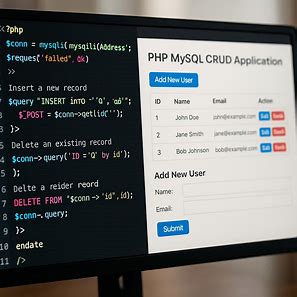
Contoh Project PHP + MySQL CRUD
Ini adalah tutorial lengkap contoh project PHP sederhana dengan database MySQL menggunakan MySQLi. Project ini memiliki fitur CRUD (Create, Read, Update, Delete) dan bisa langsung dijalankan di localhost.
1. Struktur Folder
php-mysql-sample/
?? index.php
?? config.php
?? add.php
?? edit.php
?? delete.php
?? style.css
2. File Koneksi Database (config.php)
<?php
$host = "localhost";
$user = "root";
$pass = "";
$db = "my_database";

$conn = new mysqli($host, $user, $pass, $db);
if($conn->connect_error){
    die("Koneksi gagal: " . $conn->connect_error);
}
?>
3. Halaman Index (index.php)
<?php
include "config.php";
$result = $conn->query("SELECT * FROM users");
?>

<!DOCTYPE html>
<html lang="id">
<head><meta charset="UTF-8"><title>Daftar User</title><link rel="stylesheet" href="style.css"></head>
<body>
<h1>Daftar User</h1>
<a href="add.php">Tambah User</a>
<table border="1">
<tr><th>ID</th><th>Nama</th><th>Email</th><th>Aksi</th></tr>
<?php while($row = $result->fetch_assoc()): ?>
<tr>
<td><?= $row['id'] ?></td>
<td><?= htmlspecialchars($row['name']) ?></td>
<td><?= htmlspecialchars($row['email']) ?></td>
<td>
<a href="edit.php?id=<?= $row['id'] ?>">Edit</a> |
<a href="delete.php?id=<?= $row['id'] ?>" onclick="return confirm('Yakin hapus?')">Hapus</a>
</td>
</tr>
<?php endwhile; ?>
</table>
</body>
</html>
4. Tambah Data (add.php)
<?php
include "config.php";
if($_SERVER['REQUEST_METHOD']=='POST'){
    $name = $_POST['name'];
    $email = $_POST['email'];
    $stmt = $conn->prepare("INSERT INTO users (name,email) VALUES (?,?)");
    $stmt->bind_param("ss",$name,$email);
    $stmt->execute();
    header("Location: index.php");
}
?>

<!DOCTYPE html>
<html lang="id">
<head><meta charset="UTF-8"><title>Tambah User</title><link rel="stylesheet" href="style.css"></head>
<body>
<h1>Tambah User</h1>
<form method="POST">
Nama: <input type="text" name="name" required><br>
Email: <input type="email" name="email" required><br>
<button type="submit">Simpan</button>
</form>
<a href="index.php">Kembali</a>
</body>
</html>
5. Edit Data (edit.php)
<?php
include "config.php";
$id = $_GET['id'];
$result = $conn->query("SELECT * FROM users WHERE id=$id");
$user = $result->fetch_assoc();

if($_SERVER['REQUEST_METHOD']=='POST'){
    $name = $_POST['name'];
    $email = $_POST['email'];
    $stmt = $conn->prepare("UPDATE users SET name=?, email=? WHERE id=?");
    $stmt->bind_param("ssi",$name,$email,$id);
    $stmt->execute();
    header("Location: index.php");
}
?>

<!DOCTYPE html>
<html lang="id">
<head><meta charset="UTF-8"><title>Edit User</title><link rel="stylesheet" href="style.css"></head>
<body>
<h1>Edit User</h1>
<form method="POST">
Nama: <input type="text" name="name" value="<?= htmlspecialchars($user['name']) ?>" required><br>
Email: <input type="email" name="email" value="<?= htmlspecialchars($user['email']) ?>" required><br>
<button type="submit">Update</button>
</form>
<a href="index.php">Kembali</a>
</body>
</html>
6. Hapus Data (delete.php)
<?php
include "config.php";
$id = $_GET['id'];
$conn->query("DELETE FROM users WHERE id=$id");
header("Location: index.php");
7. Styling CSS (style.css)
body { font-family: Arial, sans-serif; margin: 20px; }
h1 { color: #2c3e50; }
table { border-collapse: collapse; width: 100%; margin-top: 10px;}
th, td { border: 1px solid #ccc; padding: 8px; text-align: left; }
a { color: #2980b9; text-decoration: none; }
a:hover { text-decoration: underline; }
form input { margin: 5px 0; padding: 5px; }
button { padding: 5px 10px; background: #27ae60; color: #fff; border: none; border-radius: 3px; cursor: pointer; }
button:hover { background: #2ecc71; }
8. SQL Database
CREATE DATABASE my_database;
USE my_database;

CREATE TABLE users (
id INT AUTO_INCREMENT PRIMARY KEY,
name VARCHAR(100) NOT NULL,
email VARCHAR(100) NOT NULL
);
9. Cara Menjalankan
- Buat database `my_database` dan tabel `users` menggunakan SQL di atas.
- Simpan semua file di folder project (misal `php-mysql-sample`).
- Jalankan server lokal seperti XAMPP, WAMP, atau Laragon.
- Buka browser dan akses `index.php` untuk mulai menggunakan CRUD.
Artikel Lainnya:
- Panduan Lengkap Mobile JKN: Cara Instal & Daftar Antrian Online Puskesmas Ajibarang I
- Cara Mencegah SQL Injection di PHP & MySQL (Keamanan Web Klinik)
- Cara Membuat Sistem Login Multi-Level (Admin, Bidan/Dokter, Pasien) di PHP & MySQL
- Cara Membuat Desain Database Sistem Rekam Medis MySQL (Relasi One-to-Many)
- Mudahnya Membuat Link Chat Langsung dengan WA Generator imandroid.web.id
Belum ada komentar. Jadilah yang pertama berkomentar!